Card Creation
Card creation can require different fields depending on type (virtual, plastic) and affiliation (customer, non-personalized).
**Virtual Cards** - to create a virtual card associated with a customer account, please include the account identifier and type of card (virtual). In case the name of the merchant/user is not present in the customer profile, please specify them in the emboss name, emboss name line 4, first and last name (for natural persons) fields of the API request.
**Plastic Cards** - the requirements for plastic card issuing for an account associated with a customer are similar to those for virtual cards. The only addition is to include the delivery details of the cardholder.
The program associated with the account will be used when the card is created. Virtual accounts use the balance of the primary (main) account.
**Non-personalized virtual cards** - the required fields are program code and type of the card (virtual).
**Non-personalized plastic cards** - the requirements for non-personalized plastic card issuing are similar to those for non-personalized virtual cards. The only addition is to include the card delivery details.
For all cases above there are additional fields which can be provided like PIN, fulfil and thermal line data. Card 3DS details can also be provided in order for the card to be enrolled immediately after creation.
Please be advised that fulfil and thermal line data usage and placement on the card may vary depending on the personalization bureau. Contact your account manager before usage.
Operation card_create
Request body
| Field |
Type |
Description |
program
|
string
(0,any)
|
|
account
|
string
(0,any)
|
|
merchant
|
string
(0,any)
|
Required only for non pesonalized card in case must be assigned to merchant immediately.
|
user
|
string
(0,any)
|
Required only for non pesonalized card in case must be assigned to user immediately.
|
aml
|
string
(0,any)
|
Token of AML check. Conditinal: depending on program configuration
|
emboss_name
|
string
(0,any)
|
|
emboss_name_line4
|
string
(0,any)
|
|
fulfil1
|
string
(0,any)
|
|
fulfil2
|
string
(0,any)
|
|
thermal_line1
|
string
(0,any)
|
|
thermal_line2
|
string
(0,any)
|
|
active
|
boolean
|
|
pin
|
string
(0,any)
|
|
type
|
string
(0,any)
|
plasticvirtual
|
first_name
|
string
(0,any)
|
|
last_name
|
string
(0,any)
|
|
alias
|
string
(0,any)
|
|
url
|
string
(0,any)
|
|
Example request
{
    "program": "card_eur",
    "account": "a451c34e-56d7-4e7f-8b6c-3322791ea792",
    "merchant": "b204ac3f-a23e-442b-a909-898238197070",
    "user": "b204ac3f-a23e-442b-a909-898238197070",
    "aml": "b204ac3f-a23e-442b-a909-898238197070",
    "emboss_name": "John Doe",
    "emboss_name_line4": "JohnDoe Ltd",
    "fulfil1": "123456",
    "fulfil2": "789123",
    "thermal_line1": "123456",
    "thermal_line2": "789123",
    "active": false,
    "pin": "1234",
    "type": "virtual",
    "first_name": "John",
    "last_name": "Doe",
    "alias": "Shopping Card",
    "delivery_details": {
        "city": "Sofia",
        "country": "BG",
        "county": "Sofia Grad",
        "zip": "1407",
        "address1": "James Bouchier 76A",
        "address2": "Paynetics Office",
        "address3": "Floor 2",
        "method": "string",
        "code": "string",
        "mobile_phone": "+3590000000"
    },
    "three_domain_enrolment": {
        "otp_sms": "+3590000000",
        "biometric": true
    },
    "url": "http://example.url"
}
Response
| Field |
Type |
Description |
code
|
integer
(0,any)
|
|
Example response
{
    "code": 0,
    "data": {
        "program": "account_eur",
        "token": "202f828a-c594-436d-b753-87c47556ef11",
        "merchant": "68f63588-2859-4997-8a23-29c59223e6ba",
        "user": "5eef34b5-69d8-4596-a9d3-b3aad500e825",
        "type": "default",
        "number": "0123456789",
        "link_key": "1234",
        "is_main": true,
        "status": "active",
        "multicurrency": false,
        "balances": [
            {
                "available": 1.23,
                "blocked": 1.23,
                "currency": "EUR",
                "token": "338e7368-4800-40ad-a4db-2e3df401087b",
                "iban": "BG31PATC4002115468108680",
                "sort_code": "123456",
                "account_number": "12345678",
                "number": "0123456789",
                "is_main": true
            }
        ]
    }
}
Card Conversion
Virtual cards can be converted to plastic. The requirement for conversion is card delivery details to be present when the virtual card was created or added when making a request to the conversion API endpoint.
Operation card_convert
Path parameters
| Name | Example | Description |
|---|
card |
e61bac10-5be2-49e6-99e1-82ccfd4cb644 |
Token from card creation |
Response
| Field |
Type |
Description |
code
|
integer
(0,any)
|
|
Example response
{
    "code": 0
}
Card Activation
Plastic cards are always created not activated, meaning no transactions can be executed with the card before activation. Activation is a one-time process and must be done once the card is received by the cardholder for security reasons.
Operation card_activate
Path parameters
| Name | Example | Description |
|---|
card |
e61bac10-5be2-49e6-99e1-82ccfd4cb644 |
Token from card creation |
Request body
| Field |
Type |
Description |
aml
|
string
(0,any)
|
Conditional: For some cases for non personalized cards.
|
Example request
{
    "aml": "f37377c0-50c0-4324-a330-902f92db23a4"
}
Response
| Field |
Type |
Description |
code
|
integer
(0,any)
|
|
Example response
{
    "code": 0
}
Card Status and Termination
There are 3 statuses that a card can have:
Active
By default, cards are created in active status. This means that card transactions can be executed with the card on POS, ATM, E-commerce, etc.
Please be advised, active status is different than card activation. While activation is a one-time process, card statuses can be changed between active/inactive at any time.
Inactive
Inactive status restricts all transactions with the card. The status is reversable to active.
Closed
Void status destroys the card. No transactions can be done.
! The status is not reversable !
Card Limits and Fees
By default, limit and fee groups are set upon card creation depending on program configuration. Each limit/fee group can be changed or removed at any time.
The group codes will be provided by Paynetics and must be associated with the program, or the change will not be executed.
Operation card_groups
Path parameters
| Name | Example | Description |
|---|
card |
e61bac10-5be2-49e6-99e1-82ccfd4cb644 |
Token from card creation |
Request body
| Field |
Type |
Description |
usage
|
string
(0,any)
|
|
fees
|
string
(0,any)
|
|
schedule_fees
|
string
(0,any)
|
|
web_service_fees
|
string
(0,any)
|
|
limits
|
string
(0,any)
|
|
linkage
|
string
(0,any)
|
|
mcc
|
string
(0,any)
|
|
whitelist
|
string
(0,any)
|
|
Example request
{
"usage": "usage_group_1",
"fees": "fee_group_1",
"schedule_fees": "schedule_fee_group_1",
"web_service_fees": "web_services_fee_group_1",
"limits": "limits_group_1",
"linkage": "linkage_group_1",
"mcc": "mcc_black_group_1",
"whitelist": "whitelist_group_1"
}
Response
| Field |
Type |
Description |
code
|
integer
(0,any)
|
|
Example response
{
    "code": 0
}
Card PIN Management
Card PIN can be retrieved using API at any time.
{ GET }
Operation card_retrieve_pin
Path parameters
| Name | Example | Description |
|---|
card |
e61bac10-5be2-49e6-99e1-82ccfd4cb644 |
Token from card creation |
Response
| Field |
Type |
Description |
code
|
integer
(0,any)
|
|
Example response
{
"code": 0,
"data": {
"pin": "0123"
}
}
{ POST }
It can be sent to the cardholder via SMS depending on the program configuration. The mobile phone number added upon card creation will be used. In case the phone number must be changed please use the cardholder details update API.
Operation card_send_pin
Path parameters
| Name | Example | Description |
|---|
card |
e61bac10-5be2-49e6-99e1-82ccfd4cb644 |
Token from card creation |
Response
| Field |
Type |
Description |
code
|
integer
(0,any)
|
|
Example response
{
    "code": 0
}
{ DELETE }
Error counter can be reset using API. This is needed in case the cardholder has entered an incorrect PIN/CVV several times on POS, ATM or online.
Operation card_reset_pin
Path parameters
| Name | Example | Description |
|---|
card |
e61bac10-5be2-49e6-99e1-82ccfd4cb644 |
Token from card creation |
Response
| Field |
Type |
Description |
code
|
integer
(0,any)
|
|
Example response
{
    "code": 0
}
Card 3DS Enrollment
Card can be enrolled for 3DS for both OTP SMS authentication and/or biometric authentication. For OTP SMS authentication the mobile phone number of the account holder is required.
Operation card_3ds_enrol
Path parameters
| Name | Example | Description |
|---|
card |
e61bac10-5be2-49e6-99e1-82ccfd4cb644 |
Token from card creation |
Request body
| Field |
Type |
Description |
otp_sms
|
string
(0,any)
|
|
biometric
|
boolean
|
|
Example request
{
"otp_sms": "+3590000000",
"biometric": true
}
Response
| Field |
Type |
Description |
code
|
integer
(0,any)
|
|
Example response
{
    "code": 0
}
Enrolment mobile phone
**\* number can be amended at a later stage.**
Operation card_3ds_update
Path parameters
| Name | Example | Description |
|---|
card |
e61bac10-5be2-49e6-99e1-82ccfd4cb644 |
Token from card creation |
Request body
| Field |
Type |
Description |
otp_sms
|
string
(0,any)
|
|
Example request
{
"otp_sms": "+3590000000"
}
Response
| Field |
Type |
Description |
code
|
integer
(0,any)
|
|
Example response
{
    "code": 0
}
Enrolment for both types
**\* can be disabled at any time but is not recommended.**
Operation card_3ds_remove
Path parameters
| Name | Example | Description |
|---|
card |
e61bac10-5be2-49e6-99e1-82ccfd4cb644 |
Token from card creation |
Request body
| Field |
Type |
Description |
type
|
string
(0,any)
|
|
Example request
{
"type": "string"
}
Response
| Field |
Type |
Description |
code
|
integer
(0,any)
|
|
Example response
{
    "code": 0
}
List / detail
Something about list and detail
List
Operation cards_list
Path parameters
| Name | Example | Description |
|---|
page |
— |
|
limit |
— |
|
Query parameters
| Name | Example | Description |
|---|
merchant |
{{uuid}} |
Token of merchant |
user |
{{uuid}} |
Token of user |
Response
| Field |
Type |
Description |
code
|
integer
(0,any)
|
|
Example response
{
    "code": 0,
    "data": {
        "items": [
            {
                "token": "string",
                "type": "string",
                "is_digitalized": "boolean",
                "is_activated": "boolean",
                "is_otp_sms_enabled": "boolean",
                "is_bio_enabled": "boolean",
                "external_identifier": "string",
                "status": "string",
                "branch_code": "string",
                "delivery_details": {
                    "country": "string",
                    "county": "string",
                    "city": "string",
                    "zip": "string",
                    "address1": "string",
                    "address2": "string",
                    "address3": "string",
                    "mobile_phone": "string",
                    "first_name": "string",
                    "last_name": "string"
                },
                "is_issued": "boolean",
                "user": "string",
                "merchant": "string",
                "first_name": "string",
                "last_name": "string",
                "emboss_name": "string",
                "emboss_name_line4": "string"
            }
        ],
        "total_items": "1"
    }
}
Detail
Operation card_details
Path parameters
| Name | Example | Description |
|---|
card |
e61bac10-5be2-49e6-99e1-82ccfd4cb644 |
Token from card creation |
card |
e61bac10-5be2-49e6-99e1-82ccfd4cb644 |
Token from card creation |
Response
| Field |
Type |
Description |
code
|
integer
(0,any)
|
|
Example response
{
    "code": 0,
    "data": {
        "token": "string",
        "type": "string",
        "is_digitalized": "boolean",
        "is_activated": "boolean",
        "is_otp_sms_enabled": "boolean",
        "is_bio_enabled": "boolean",
        "external_identifier": "string",
        "status": "string",
        "branch_code": "string",
        "delivery_details": {
            "country": "string",
            "county": "string",
            "city": "string",
            "zip": "string",
            "address1": "string",
            "address2": "string",
            "address3": "string",
            "mobile_phone": "string",
            "first_name": "string",
            "last_name": "string"
        },
        "is_issued": "boolean",
        "user": "string",
        "merchant": "string",
        "first_name": "string",
        "last_name": "string",
        "emboss_name": "string",
        "emboss_name_line4": "string"
    }
}
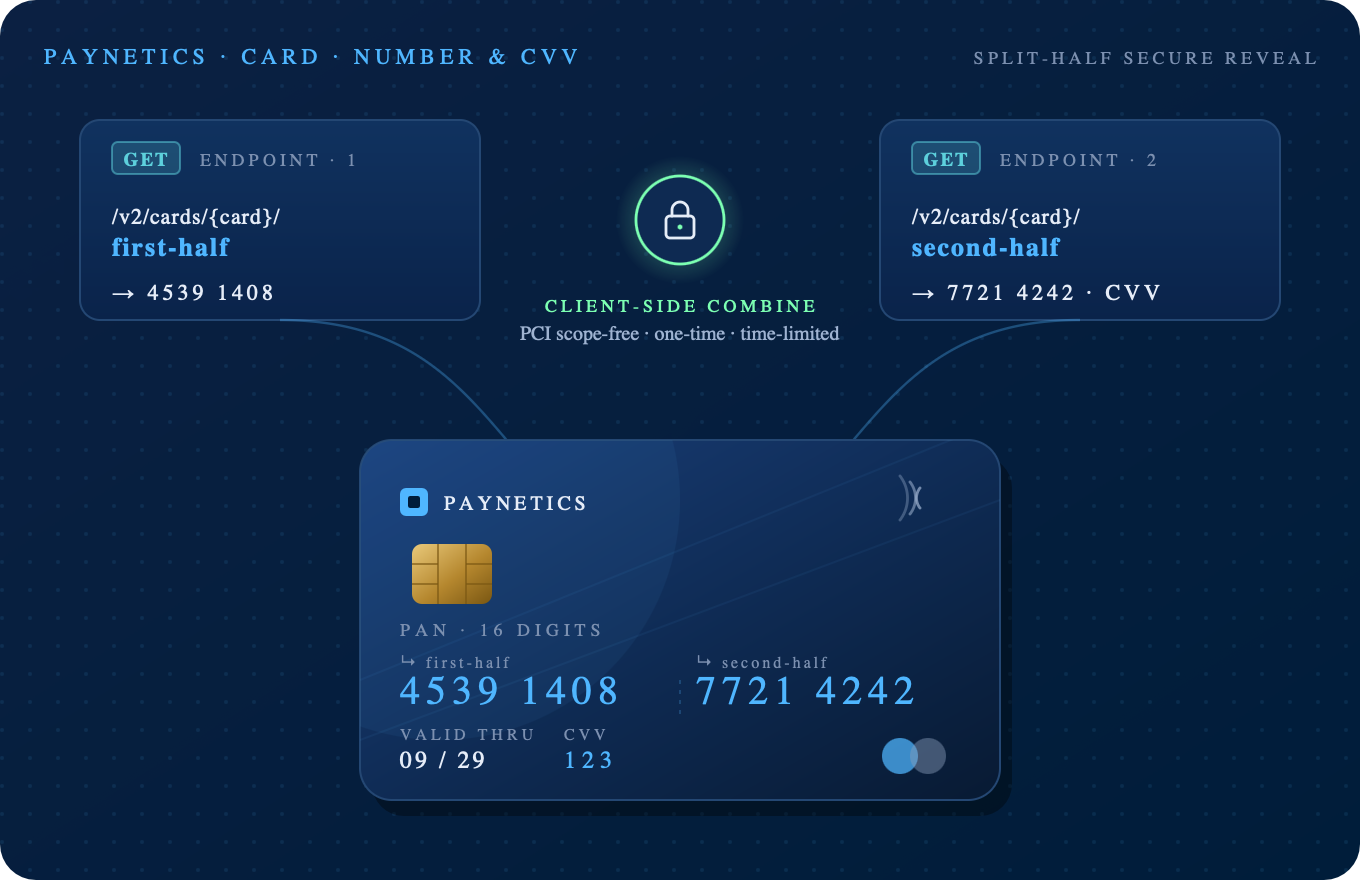
Firs half
Operation card_number
Path parameters
| Name | Example | Description |
|---|
card |
e61bac10-5be2-49e6-99e1-82ccfd4cb644 |
Token from card creation |
Response
| Field |
Type |
Description |
code
|
integer
(0,any)
|
|
Example response
{
    "code": 0,
    "data": {
        "pan": "5355XXXXXXXX0316",
        "expiration_month": "04",
        "expiration_year": "26"
    }
}
Second half
Operation card_number
Path parameters
| Name | Example | Description |
|---|
card |
e61bac10-5be2-49e6-99e1-82ccfd4cb644 |
Token from card creation |
Response
| Field |
Type |
Description |
code
|
integer
(0,any)
|
|
Example response
{
    "code": 0,
    "data": {
        "pan": "XXXX94203030XXXX",
        "cvv": "671"
    }
}